
Hopper HQ: a per-account social media scheduler built around visual planning and bulk upload
Hopper HQ is a social media scheduler built by the UK company Hopper HQ Limited, focused on batching content and auto-publishing from a calendar: a visual calendar and Instagram grid preview, bulk upload of up to 50 files or CSV import of up to 350 posts, plus AI captions, hashtags and content strategy planning. It is priced per connected social account: Grow costs $6 per account billed monthly, or $5 per month billed annually, for 1 user; Scale costs $12 per account billed monthly, or $10 per month billed annually, with unlimited users plus team permissions and content approvals; otherwise the two plans have the same features. It supports 9 networks: Instagram, Facebook Pages, TikTok, Threads, X, Bluesky, LinkedIn, Pinterest and YouTube Shorts. It suits individuals, small businesses and small agencies with a handful of accounts, mostly images and short video, who want to schedule a month of content in one sitting; it has no social inbox, DM replies or social listening, so teams that need those should look elsewhere.
This button jumps to the Hopper HQ official website. SocialKit may use affiliate links to earn commissions on some products in the future; inclusion and reviews will not change because of this.
Who it is suitable for, and who it is not
Suitable
- Solo creators and small businesses running only a few accounts: with per-account pricing, 1 account on Grow is $5 per month billed annually or $6 billed monthly, with all publishing, analytics, AI and link-in-bio features included.
- People who plan a week or a month of content in one sitting: bulk upload up to 50 images or videos at a time, or import up to 350 posts by CSV, then drag them to new dates on the calendar.
- Brands that care about the look of their Instagram feed: grid preview and drag-and-drop arrangement, scheduling for feed posts, carousels, Reels and Stories, with preset first comments, locations, user tags and collaborators.
- Small agencies that need several people but don’t want per-seat pricing: Scale allows unlimited users with roles such as admin, publishing and read-only, and lets teammates or clients approve posts before they go out.
- Creators who share the same short video on several networks: send it to TikTok, Instagram Reels, YouTube Shorts and more in one step, with “Split Caption” for a separate caption per network.
May not be suitable
- Teams that need to reply to comments and DMs inside the tool: the help center says social inbox management is not supported, and neither is reading or sending direct messages.
- Brands that need social listening, keyword monitoring or competitor analysis: neither the website nor the help center lists such features.
- Agencies with many accounts: the price rises linearly with the number of accounts, e.g. 25 accounts on Scale billed annually come to about $250 per month, so the more accounts you have, the more it pays to compare tools with bundled plans.
- Users who need to post to Facebook personal profiles, groups or Facebook Stories, or publish X threads or LinkedIn PDF document posts: the help center says none of these are supported yet.
- Users who don’t want to add a card for a trial, want to pay with PayPal or expect refunds: the 14-day trial requires a card up front, PayPal is not accepted, paid fees are non-refundable and annual cancellations are not refunded pro rata.
Main functions
Scheduling and auto-publishing
- Week / month calendar and “All Accounts View”: drafts, pending approvals, scheduled and published posts for every account in one calendar, filterable by account and post status, with drag-and-drop rescheduling
- Auto-publishing: feed posts, Reels, carousels and videos go live at the set time with a confirmation; or tick “Use Reminders Instead of Autopost” to get a push reminder in the mobile app and publish manually
- Default posting slots fill new posts in automatically; multiple time zones, drafts, rescheduling of published posts and post failure rules
- One post can go to several accounts at once (“linked posts”); edits to the caption or time sync across all networks, and “Split Caption” lets you write a different caption for each network
- Instagram: grid preview with drag-and-drop arrangement, first comments, user tags, locations, collaborator posts and video covers
Bulk upload and CSV import
- Bulk upload: up to 50 images or videos at a time from your computer, Dropbox, Google Drive and more than 20 other cloud storage services, then assign them to calendar slots
- CSV import: up to 350 posts per file, with columns for caption, publish time, first comment, media links and notes; separate multiple images with semicolons to build a carousel
- CSV import supports Instagram, Facebook, X, LinkedIn, YouTube and TikTok, but not Pinterest; every row needs a publish time, and a separate YouTube title cannot be set
- Bulk editing and “Bulk Set Destination Platform”: assign target accounts to a batch of posts in one go
AI and content creation
- Unlimited AI assistant on every plan: captions from uploaded images (Generate Caption), notes rewritten into full captions (Text Transform) and hashtags generated from the caption
- Strategy Planner: analyzes connected accounts and builds a content strategy with goals, a 3-week content calendar, post ideas, posting times and platform tips, then bulk-creates posts from it; not available for Bluesky
- Image editing: crop, filters, frames, text overlays, color adjustment and AI image upscaling
- Hashtag Explorer: search a hashtag database by topic and engagement (the homepage says more than 10,000,000, the features page says 9,000,000 indexed); save hashtag groups and frequently used captions
- Remove the TikTok watermark when reposting from TikTok to Instagram
Analytics
- Instagram business accounts: account data (new followers, impressions, reach, profile views, website and email clicks), an online-follower heat map with age / gender / location breakdowns, per-post engagement ranking and hashtag performance
- Facebook Pages: post data and hashtag performance; X: account and post data; LinkedIn: company pages only, with followers, page views and post likes and comments
- Post data includes posts not published through Hopper HQ; hashtag analytics read only the caption, not hashtags in the first comment
- Instagram must be linked to a Facebook Page to show analytics, and after first connecting, data goes back at most 28 days
- Reports export in one click; Link in Bio has its own stats for visits, unique visitors, sources, devices and per-link click-through rate
Team collaboration
- Grow: 1 user; Scale: unlimited users
- Scale: team permissions (such as admin, publishing and read-only) and content approvals; clients can also be invited to review and approve posts inside the platform
- Post notes: leave comments for teammates on drafts; saved captions and hashtag groups can be reused
Link in bio and mobile apps
- Every social account includes a Link in Bio page with themes, links to your website / shop / blog / social profiles and custom button styles, for use in Instagram and TikTok bios
- The iOS and Android apps let you view and edit the schedule and receive manual-publishing reminders; Bluesky scheduling is currently web-only
Supported social media platforms
Compiled from the per-network scheduler pages on the Hopper HQ website and the help center publishing guides. Whether a post can be auto-published and which data you can see depend on each network’s official API; the website “Analytics” page and the help center disagree about data support for some networks, see “Limits and caveats” below.
| Platforms | Account types that can be connected | What you can schedule in Hopper HQ | Description |
|---|---|---|---|
| Business, creator and personal accounts | Feed posts, carousels (up to 10 items), Reels, Stories; first comments, user tags, locations, collaborators | Business accounts auto-publish; personal accounts use mobile reminders only; creator accounts cannot auto-publish Stories; account, post, best-time and hashtag analytics | |
| Pages | Text, images, video, Reels (up to 90 seconds, 9:16, under 1 GB) | No personal profiles, groups or Stories; post and hashtag analytics | |
| TikTok | TikTok account | Video, carousels (up to 35 images or videos) | Auto-publishes; TikTok library music cannot be added (use mobile reminders if you need it); the help center says TikTok analytics are not available yet |
| Threads | Personal profiles | Text, images, video, carousel | Auto-publishes and shares the visual calendar with Instagram |
| X(Twitter) | Profiles (multiple accounts) | Text, images, GIFs, video | Auto-publishes; 280 characters, or long-form posts for X Premium accounts; no threads; account and post analytics |
| Bluesky | Personal profiles | Text (300 characters), links, up to 4 images or 1 video under 60 seconds | Scheduling on the web app only; no analytics; not supported by Strategy Planner |
| Personal information, company page | Text, images, articles, video (up to 30 minutes or 5 GB) | No PDF document posts or @mentions; analytics for company pages only | |
| Boards | Image Pins, Video Pins and Idea Pins with title, description and destination link | Auto-publishes to any board; CSV import does not support Pinterest; the help center says Pinterest analytics are not available yet | |
| YouTube Shorts | Channel | Shorts (up to 3 minutes) | HD only, 100-character titles, tags up to 500 characters in total, no custom covers; the help center says YouTube analytics are not available yet |
Price and billing method
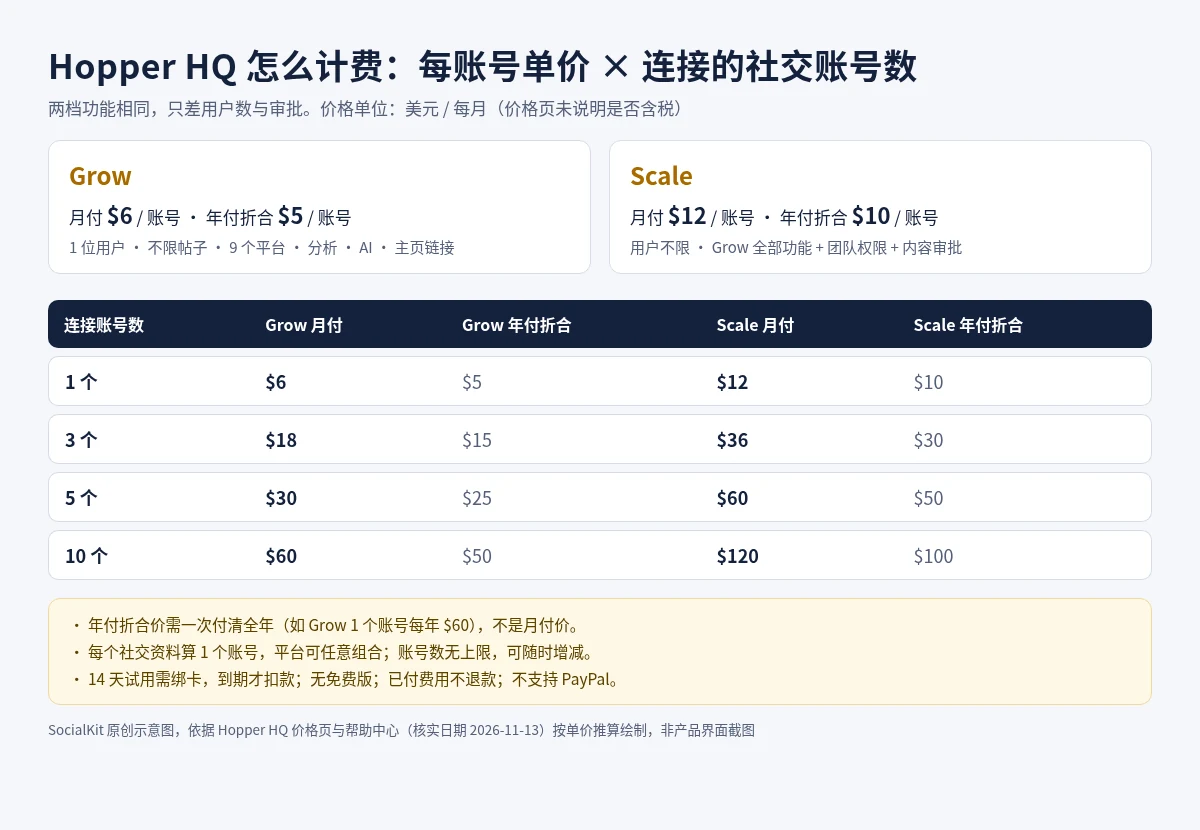
Prices are in US dollars; the pricing page does not say whether tax is included. Hopper HQ charges per connected social account, not per seat: total = per-account price × number of accounts. The “billed annually” price on the pricing page is the annual price expressed as a monthly average, paid upfront for the full year, and is not the monthly price; the “billed monthly” price is what you pay month to month.
| Plan | Billed monthly (per account per month) | Billed annually (monthly average per account, paid upfront for the year) | Users | Key differences |
|---|---|---|---|---|
| Grow | $6 | $5 (about $60 per account per year, calculated from the unit price) | 1 user | Visual planner, calendar, unlimited posts, unlimited AI, image editing, link in bio, hashtag tools, analytics, mobile apps |
| Scale | $12 | $10 (about $120 per account per year, calculated from the unit price) | Any | Everything in Grow, plus team permissions and content approvals |
- Pricing examples (pricing page): one Instagram account on Grow billed annually is $5 per month; 3 accounts are $15 per month; 10 accounts on Scale are $100 per month.
- Free trial: 14 days; a card is required at signup and is charged only when the trial ends, and cancelling in billing settings during the trial costs nothing; there is no free plan.
- Refunds: paid subscriptions are non-refundable; annual cancellations are not refunded pro rata, and access continues to the end of the current period.
- Payment: cards (Stripe); PayPal is not accepted.
- Non-profits: after starting a trial, submit proof of registered charity or non-profit status for a 50% discount (help center).
- Add or remove accounts, switch between Grow and Scale, or move between monthly and annual billing at any time; no contracts.
Prices verified on 2026-11-14. Sources: the Hopper HQ pricing page (plan cards, the “Plans at a glance” table and FAQ; the page says prices were updated on 2026-10-27), the website FAQ page, and help center articles on trial card details, refunds, PayPal, the non-profit discount and adding or removing accounts. In a browser the pricing page defaults to annual billing for 1 account: Grow $5, Scale $10; the monthly unit prices in the page script are $6 and $12, matching the price table. The checkout page is authoritative.
Limitations and Precautions
- Priced per connected social account: each connected profile (such as one Instagram account, one TikTok account or one Facebook Page) counts as one account, and the monthly fee = unit price × number of accounts; there is no cap on accounts, and you can add or remove them any time in billing settings.
- Grow and Scale have the same features; the only difference is that Scale allows unlimited users and adds team permissions and content approvals, while Grow is limited to 1 user.
- No social inbox, so you cannot reply to comments or send and receive DMs; no social listening either.
- Facebook supports Pages only, not personal profiles, groups or Stories; Facebook posts show a “Published by Hopper HQ” label that only Page admins can see.
- Instagram personal accounts can only publish via mobile reminders and must switch to a business account for auto-publishing; the help center says creator accounts cannot auto-publish Stories.
- X threads are not supported; LinkedIn PDF document posts and @mentions of other accounts are not supported; Bluesky posts are limited to 300 characters and 4 images or 1 video under 60 seconds (images and video cannot be mixed), with no analytics.
- YouTube videos are published in HD only (no 4K), titles are limited to 100 characters and custom covers are not supported; TikTok and Facebook Reels cannot use the platform music libraries.
- The trial requires a card up front (processed by Stripe) and PayPal is not accepted; paid subscriptions are non-refundable and annual cancellations are not refunded pro rata, though access continues to the end of the current billing period.
- Posts are unlimited, but the help center recommends respecting each network’s own posting limits, especially for new accounts.
The website is inconsistent in several places: the “Analytics” page says analytics cover Instagram, Facebook, Threads, LinkedIn, TikTok, Pinterest, X and YouTube Shorts, but the help center (updated 2024-09) says TikTok, Pinterest and YouTube analytics are not supported yet and has no article on Threads analytics; the Instagram scheduler page says Stories can be auto-published, while the auto-posting page says Instagram Stories use a one-tap mobile reminder, and the help center adds that creator accounts cannot auto-publish Stories; the help center says annual billing “saves 15%” and mentions multi-account discounts, while the pricing page unit prices ($6 monthly, $5 per month billed annually) work out to about 16.7% off and totals scale linearly with no multi-account discount shown. Prices on this page follow the pricing page and platform limits follow the help center; check a trial account or the checkout page.
Recent updates
- The pricing page shows an updated price table; compared with the 2026-07-16 web archive, per-account prices for Grow and Scale are unchanged ($6 / $12 billed monthly, $5 / $10 per month billed annually).
- Official status update: the publishing issue that began on 8/18 has been fixed.
- Official status update: the Instagram publishing issues that began on 5/23 were caused by a Meta platform problem and have been resolved.
- Official status update: some posts were delayed on 4/10–13 (a blocked publishing queue and a server storage issue); fixed, and the team says it is adding monitoring and spreading publishing across multiple servers.
- Official status update: from 3/25 a small number of TikTok posts caused the publishing queue to retry repeatedly and delayed other posts; fixed by adding a time limit to the TikTok completion check.
- Help center updates the “add and remove accounts” guide: add or remove accounts and switch between monthly and annual billing yourself in billing settings.
- Help center covers Facebook Reels scheduling (up to 90 seconds, 9:16) and Bulk Set Destination Platform for assigning accounts in bulk.
- Help center covers TikTok carousel scheduling, with up to 35 images or videos per post.
- Help center introduces “All Accounts View”: posts from every account in one calendar, now the default landing view.
- Help center introduces Strategy Planner: generates a 3-week content strategy from connected accounts and can bulk-create posts.
Hopper HQ has no public changelog page (/changelog/ returns 404), and the help center “Product Updates” collection has only 2 older articles. The items below come from the date on the pricing page, a web archive comparison, the official status updates (Hopper HQ Status Updates) and the update dates of help center feature articles, newest first; a help center article date is when the article was updated, not necessarily when the feature launched.
FAQ
Is there a free version of Hopper HQ?
No. Hopper HQ only offers a 14-day free trial; a card is required at signup and is charged only when the trial ends, and cancelling in billing settings during the trial costs nothing.
Hopper HQ How much does it cost?
Priced per connected social account, in US dollars. Grow is $6 per account billed monthly, or $5 per month billed annually; Scale is $12 per account billed monthly, or $10 per month billed annually. Total = unit price × number of accounts; for example, 3 accounts on Grow billed annually come to $15 per month.
Is the $5 on the price page the monthly payment price?
No. $5 is the Grow annual price expressed as a monthly average per account and is paid upfront for the full year (about $60 per account per year by the unit price); billed monthly it is $6 per account per month. Scale works the same way: $10 billed annually, $12 billed monthly.
What is the difference between Grow and Scale?
The features are the same: both include unlimited posts, every network, analytics, link in bio, hashtag tools and the AI assistant. The only difference is that Grow has 1 user, while Scale allows unlimited users and adds team permissions and content approvals, which suits teams and agencies.
Which social networks does Hopper HQ support?
Instagram, Facebook Pages, TikTok, Threads, X (Twitter), Bluesky, LinkedIn, Pinterest and YouTube Shorts, 9 in total. You can connect several accounts on the same network, and each account is billed separately.
Does Hopper HQ really auto-publish?
Mostly yes: feed posts, Reels, carousels and videos publish automatically at the scheduled time. Instagram personal accounts can only publish via mobile reminders; the website is inconsistent about how Stories are published, and the help center says creator accounts cannot auto-publish Stories. You can also choose mobile reminders instead of auto-publishing.
Can Hopper HQ reply to comments and DMs?
No. The help center says social inbox management is not supported, and neither is reading or sending direct messages. It focuses on content planning, scheduling, publishing and basic analytics.
Can I get a refund or pay with PayPal?
The help center says paid subscriptions are non-refundable and annual cancellations are not refunded pro rata, though you keep access until the end of the current billing period; payment is by card only (processed by Stripe), and PayPal is not accepted.
Sources
- Hopper HQ homepage (platforms, features and FAQ)
- Hopper HQ pricing page (plan cards, Plans at a glance, FAQ)
- Hopper HQ features overview
- Hopper HQ auto-posting feature page
- Hopper HQ analytics feature page
- Hopper HQ agencies and brands page
- Hopper HQ Instagram scheduler page
- Hopper HQ Facebook scheduler page
- Hopper HQ X (Twitter) scheduler page
- Hopper HQ FAQ page
- Help center: Publish posts automatically or with mobile reminders
- Help center: Can I manage my social inbox with Hopper HQ?
- Help center: Can I read and send direct messages?
- Help center: Can I connect my personal Instagram account?
- Help center: Instagram Analytics
- Help center: LinkedIn Analytics
- Help center: Can I access my TikTok Analytics
- Help center: LinkedIn Scheduling
- Help center: Bluesky Scheduling
- Help center: YouTube Shorts Scheduling
- Help center: TikTok Carousels
- Help center: Facebook Reels
- Help center: CSV Bulk Upload
- Help center: Strategy Planner
- Help center: All Accounts View
- Help center: Why do I need to give card details for a free trial?
- Help center: Refund policy
- Help center: Add and remove accounts from your plan
- Help center: Non-profit discount
- Hopper HQ official status updates
- Hopper HQ Terms of Service
- Hopper HQ affiliate program page
The above page was accessed at 2026-11-14. Functions, packages and available areas may be adjusted at any time, please refer to the official website.