
SocialBee: a social media management tool that schedules posts by recurring content categories
SocialBee is a social media management tool built around "content categories" (such as blog promotion, evergreen content or promotions): you give each category weekly posting slots, and posts rotate, expire or recycle automatically on schedule. It also offers AI writing and image generation (Copilot can build a full content strategy from your website), a Canva integration, a unified inbox and analytics reports. Pricing is based on the number of social profiles in each plan: the entry Bootstrap plan costs $29 per month for 5 social profiles, and agency plans go up to 150. Its website lists direct publishing to Facebook, Instagram, Threads, LinkedIn, X (Twitter), Pinterest, TikTok, YouTube, Google Business Profile and Bluesky, but some account types can only publish via mobile reminders. It suits individuals, small businesses and small agencies that publish evergreen content consistently; enterprises needing deep social listening or large-team permission controls will find it light.
This button jumps to the SocialBee official website. SocialKit may use affiliate links to earn commissions on some products in the future; inclusion and reviews will not change because of this.
Who it is suitable for, and who it is not
Suitable
- Individuals and small businesses that rotate lots of evergreen content: set up content categories and weekly slots once, and posts recycle or expire automatically by category without daily scheduling.
- Teams with tight budgets and one or two people: Bootstrap costs $29 per month for 5 social profiles, Accelerate $49 per month for 10, and every plan includes unlimited AI captions and images.
- Small agencies and freelancers serving several clients: from Pro, each client can get its own workspace with separate profiles, content, inbox and reports, plus approval workflows and branded PDF report export.
- Teams that design in Canva: the Canva integration redesigned in 2026-03 lets you browse Canva folders and import JPG, PNG, PDF, PPTX, GIF and MP4.
- Users scheduling across many platforms such as Google Business Profile, Pinterest and Bluesky: all 10 platforms fit in one calendar.
May not be suitable
- Brands that need social listening, keyword monitoring or sentiment analysis: neither the website nor the pricing page offers social listening, and the inbox handles only comments, mentions and DMs on connected accounts.
- Enterprises with large teams: Pro includes only 3 users per workspace and agency plans 5, with extra users at $10 per month each; the website lists no enterprise controls such as SSO or custom roles.
- Creators who rely on X (Twitter) threads: the help center says multi-post threads cannot yet be published directly from SocialBee; each post must be published separately.
- Anyone wanting long-term free use: SocialBee has no free plan, only a 14-day trial; when it ends the account is locked and publishing stops until you choose a paid plan.
- Users who mainly run Instagram personal accounts, Facebook personal profiles or Facebook groups: these account types can only publish via mobile reminders, not automatically, and have no analytics.
Main functions
Content categories and scheduling
- All plans: content categories (Bootstrap 10, Accelerate 50, unlimited from Pro), up to 1,000 (Bootstrap) or 5,000 posts per category; weekly posting slots for each social profile (Flexible posting schedule)
- All plans: recycle evergreen content, expire content after a number of shares or a date, post at a specific time, drafts, tailor captions per profile (Tailored posts), post variations, first-comment scheduling, Instagram grid preview
- Calendar views: day / week / month calendar, next-week list, Instagram grid (up to 30 days ahead), weekly overview by category, plus failed posts and reasons
- Accelerate and up: CSV bulk import (captions, links, media URLs, optional posting times), bulk editor (bulk approve, delete, reassign profiles), hashtag organizer
- Content sources such as RSS imports: Bootstrap 10, Accelerate 30, unlimited from Pro; "Universal Posting" creates posting reminders for networks without a direct integration
- 2026-10 announcement: category scheduling is being simplified—Category Sequence and Random categories are gradually replaced by "active categories", and the Next Posts view is merged into the calendar and list views; biweekly, monthly and yearly scheduling options are promised later this quarter
AI and content creation
- All plans: unlimited AI content generation, including captions, post variations, hashtag suggestions, tone adjustment and AI images
- Copilot: enter your website URL or answer a few questions to get recommended platforms, content categories, posting slots and editable posts
- Built-in image editor (crop, flip), image alt text, post location, custom video thumbnails, @mentioning other accounts
- Integrations: Canva, Unsplash, GIPHY, Quu, Pocket, 10+ URL shorteners, plus Zapier, Pabbly and Make
Data analysis and reports
- All plans: audience growth and demographics, profile growth metrics, top-performing posts and content types, UTM parameters for links
- Data history: Bootstrap shows only 3 months of data, Accelerate and up 2 years
- Accelerate and up: advanced analytics; Pro and up: branded PDF report export
- Available metrics vary by platform: Facebook includes competitor analysis, Instagram business accounts and LinkedIn company pages include audience demographics, Google Business Profile has only profile, post and account activity data; Bluesky and Facebook personal profiles and groups have no analytics
- Since 2026-05 the dashboard has three new widgets: today's posting status, empty-category alerts (fillable with AI) and time saved over the last 30 days
Unified inbox (Engage)
- All plans: handle comments, mentions and DMs in one place
- Facebook Pages and Instagram business accounts: comments, mentions, DMs; Threads, LinkedIn company pages, X: comments and mentions; YouTube: comments
- Engagement for Pinterest and TikTok business accounts is on the roadmap and not yet available; LinkedIn personal profiles, Google Business Profile and Bluesky are not supported because of platform API limits
Team collaboration and multiple brands
- Bootstrap, Accelerate: 1 workspace, 1 user per workspace
- Accelerate and up: post approval workflow; Pro and up: internal notes (leave feedback on posts, @mention teammates)
- Pro: 5 workspaces, 3 users per workspace; Pro50 / Pro100 / Pro150: 10 / 20 / 30 workspaces, 5 users per workspace
- Each workspace keeps its own social profiles, content, analytics and inbox, so you can separate clients or brands
Supported social media platforms
Compiled from the SocialBee help center article "What Social Accounts Can I Manage with SocialBee?", each platform's publishing guide, and the inbox and analytics list in the homepage FAQ. Direct publishing and available data depend on each platform's official API; the help center is authoritative.
| Platforms | Account types that can be connected | Content available for publication in SocialBee | Description |
|---|---|---|---|
| Pages, personal profiles, groups | Text, links, images, GIFs, video, Reels, Stories (groups exclude Reels and Stories) | Pages publish directly (admin or editor role required); personal profiles and groups publish via reminders only, with no analytics; Page inbox covers comments, mentions, DMs, and analytics include competitor analysis | |
| Business, creator and personal accounts | Single image, multiple images (up to 10 items), video, Reels, Stories, Collab posts | Professional accounts publish directly, Collab posts can tag up to 5 collaborators; personal accounts publish via reminders only; business account inbox covers comments, mentions, DMs | |
| Personal information, company page | Text (up to 3,000 characters), links, up to 9 images or GIFs, 1 video, document carousels (PDF, DOC, PPT, etc.) | Company pages require Super Admin; company page inbox covers comments and mentions, personal profiles have no engagement; document carousels work only in the new post editor and are not yet supported in bulk import | |
| X(Twitter) | Personal profiles | Text, links, images, GIFs, video | Cannot publish threads directly; inbox covers comments and mentions; the help center says lifetime-plan users publish via reminders |
| Threads | Personal profiles | Text, links, images, carousels, video | Direct publishing; inbox covers comments and mentions; analytics available |
| Business and personal accounts (boards) | Images, carousels, video | Direct publishing, analytics; engagement on the roadmap | |
| TikTok | Personal number, business number | Images (up to 12), video | A single video publishes directly, multiple videos (up to 12) via reminders; no Stories, and the API drops line breaks; analytics available, no inbox |
| YouTube | Channel | Video, Shorts | Direct publishing; inbox covers comments; analytics include audience by country |
| Google Business Profile | Locations | Text, links, single image | Requires Primary Owner, Owner or Manager role; profile, post and account activity data; no engagement |
| Bluesky | Personal profiles | Links, images | Direct publishing; no analytics or inbox |
Price and billing method
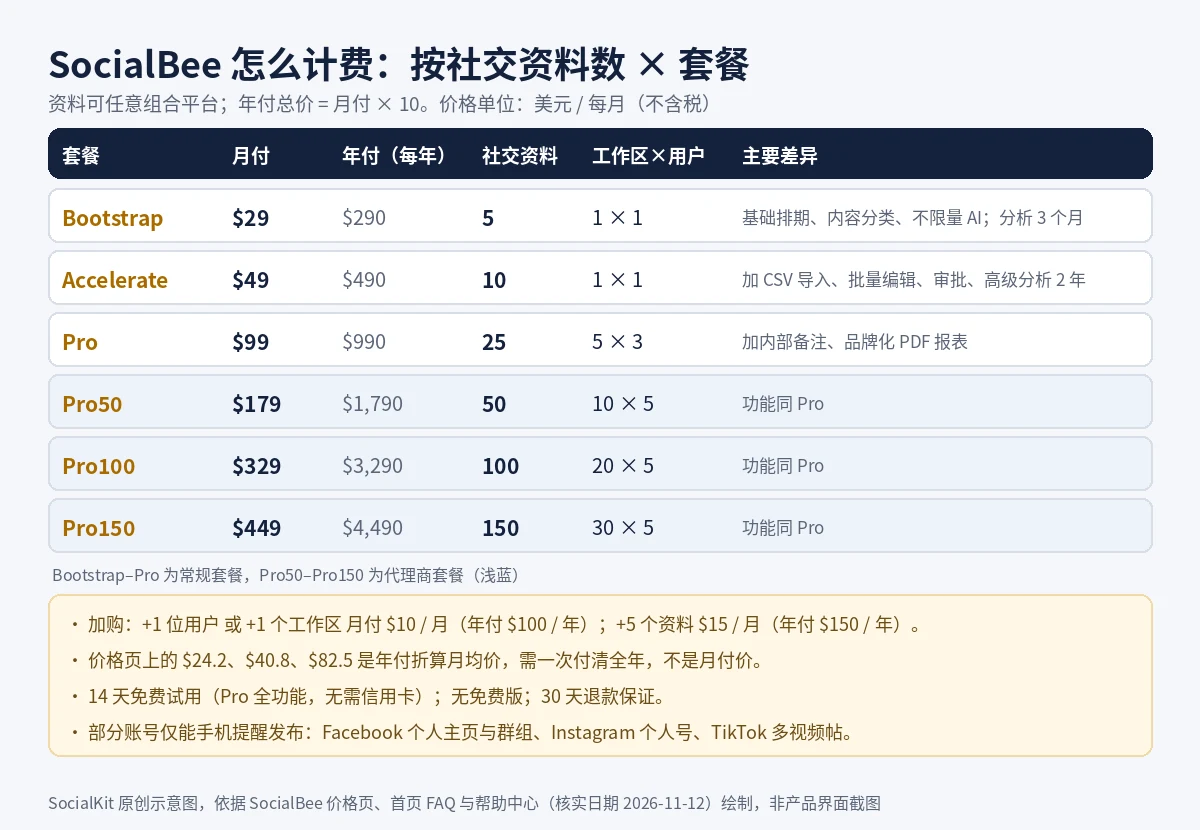
Prices are in US dollars, excluding VAT and other taxes. SocialBee tiers plans by the number of social profiles, workspaces and users per workspace, not by individual seats. "Per month, billed annually" on the pricing page is the monthly average of an annual plan paid upfront, not a monthly price; the annual total is 10 times the monthly price (e.g. Bootstrap $290 per year).
| Plan | Monthly | Annual (per year, monthly average in brackets) | Social profiles | Workspaces × users per workspace | Key differences |
|---|---|---|---|---|---|
| Bootstrap | $29 | $290 (about $24.2) | 5 | 1 × 1 | Basic scheduling, categories and unlimited AI; 3 months of analytics data |
| Accelerate | $49 | $490 (about $40.8) | 10 | 1 × 1 | Adds CSV import, bulk editing, hashtag organizer, approvals and advanced analytics with 2 years of data |
| Pro | $99 | $990 (about $82.5) | 25 | 5 × 3 | Adds internal notes and branded PDF report export |
| Pro50 | $179 | $1,790 (about $149.2) | 50 | 10 × 5 | Same features as Pro, at larger scale |
| Pro100 | $329 | $3,290 (about $274.2) | 100 | 20 × 5 | Same features as Pro |
| Pro150 | $449 | $4,490 (about $374.2) | 150 | 30 × 5 | Same features as Pro |
- Add-ons (pricing page comparison table): +1 user $10/month or $100/year; +1 workspace $10/month or $100/year; +5 social profiles $15/month or $150/year.
- Free trial: 14 days with all Pro features, no credit card; when it ends the account is locked and publishing stops, and buying a plan restores your settings and content.
- Refunds: the pricing page offers a 30-day money-back guarantee with no contracts; the homepage FAQ says monthly and annual billing are both available and you can upgrade, downgrade or cancel anytime.
- Payment methods: credit and debit cards, PayPal, Amazon Payments.
- Nonprofits and educational institutions: the pricing page mentions dedicated support and options; contact SocialBee.
- Annual subscribers can also email the company for a 100% discount code for SocialBee University courses (pricing page FAQ).
Prices verified 2026-11-12 from the SocialBee pricing page (plan cards, feature comparison and FAQ), the homepage pricing FAQ, and the help center articles "How Long Should I Wait Before Getting a Paid Plan?" and "How do I sign up for a SocialBee account?". The Pro150 monthly price of $449 comes from the homepage FAQ; the pricing page cards do not show it directly, but it matches the pricing page's Pro150 annual monthly average of $374.2. Prices exclude tax; the checkout page is final.
Limitations and Precautions
- Pricing is based on the total social profiles in your plan: each connected account counts as 1, in any mix of platforms (e.g. 2 Instagram + 1 Facebook Page + 2 X = 5). Beyond that you buy add-ons: every 5 profiles cost $15 per month on monthly plans or $150 per year on annual plans.
- Extra users and extra workspaces each cost $10 per month on monthly plans or $100 per year on annual plans; the pricing page says add-ons are purchased inside the SocialBee app.
- Bootstrap excludes CSV import, the hashtag organizer, bulk editing, approvals, internal notes and branded report export, and keeps only 3 months of analytics data; Accelerate still lacks internal notes and report export, and includes only 1 user.
- Some accounts can only publish via mobile reminders: Facebook personal profiles, Facebook groups, Instagram personal accounts and TikTok multi-video posts (up to 12 videos); Instagram posts that don't meet direct-publishing requirements also switch to reminders automatically.
- Instagram direct publishing supports only professional accounts (business or creator); Instagram accounts logged in directly without a Facebook Page can publish directly but get no analytics, inbox or tagging.
- X: up to 4 images per post (3 MB each) or 1 video (512 MB, up to 2 min 20 s); multi-post threads cannot be published directly. The help center says X posts for lifetime-plan users are published via reminders.
- TikTok: no Stories; videos must be vertical 9:16 and 1 to 10 minutes long; the platform API drops line breaks; TikTok engagement is not yet available.
- Bluesky supports only link and image posts, with no analytics or inbox; Google Business Profile supports only text, link and single-image posts.
- No social listening and no free plan. After the 14-day trial the account is locked and publishing stops; buying a plan restores your settings and content.
The website is inconsistent in places: the homepage FAQ says annual billing "saves 16%" and computes Bootstrap at $292.32 per year, while the pricing page table says $290 per year (i.e. 10 months' price); the pricing table says Facebook personal profiles publish directly, while the help center table says they publish via reminders only; and the pricing page still shows the SBDAY2026 agency promotion that ended on 2026-06-10. This page follows the pricing table for prices and the help center for publishing methods; check your trial account or the checkout page.
Recent updates
- Bluesky posts failed or were delayed due to a platform API outage; officially marked as fixed.
- Scheduling simplification announced: Category Sequence and Random categories are gradually replaced by active categories, and the Next Posts view is merged into the calendar and list views; biweekly, monthly and yearly scheduling options are promised later this quarter.
- Fixed an issue connecting and refreshing Threads.
- Official LinkedIn post on the Instagram Collab post workflow: tag up to 5 collaborators, custom video covers, automatic first comments, all schedulable.
- Billing page redesigned: subscription details, plan status and actions such as pause, cancel and invoice download were reorganized, with no change in functionality.
- TikTok publishing outage (on 8/19 and again on the 27th the team was still working with TikTok), later marked fixed; a Pinterest issue creating Pins was fixed separately on 8/14.
- New dashboard widgets: today's posting status, category content overview (fill empty categories with AI) and time saved over the last 30 days.
- Instagram professional accounts can now tag up to 5 collaborators per post, up from 3, for feed posts, carousels and Reels.
- Canva integration redesigned: connect your Canva account directly, browse folders and designs, and import JPG, PNG, PDF, PPTX, GIF and MP4.
From the SocialBee official changelog (changelog.socialbee.com) and official LinkedIn account, newest first; only feature changes and major platform outages are listed.
FAQ
Is there a free version of SocialBee?
No. SocialBee offers only a 14-day free trial with all Pro features and no credit card. When it ends the account is locked and publishing stops; buying a paid plan restores your settings, schedule and content.
SocialBee How much does it cost?
Plans are tiered by the number of social profiles, priced in US dollars excluding tax. Monthly: Bootstrap $29 (5 profiles), Accelerate $49 (10), Pro $99 (25), and agency plans Pro50 $179, Pro100 $329, Pro150 $449. The annual total is 10 times the monthly price, e.g. Bootstrap $290 per year.
Is the $24 on the price page the monthly payment price?
No. $24.2 is the monthly average of Bootstrap's annual price of $290, paid upfront for the whole year; monthly billing is $29 per month.
How are social profiles counted? Can I mix platforms?
Each connected account counts as 1 social profile; for example, 1 Facebook Page and 1 Instagram account each count as 1. Plans limit only the total, and you can mix platforms freely; beyond that, every 5 extra profiles cost $15 per month on monthly plans.
What are SocialBee "content categories" for?
Put posts into categories by topic or type, then give each category weekly posting slots; SocialBee picks posts from the category for each slot, and can recycle evergreen content or expire it after a set number of shares or a date. It suits accounts that publish steadily over time with a large content library.
Can SocialBee publish directly to Instagram personal accounts or Facebook groups?
Not directly. The help center says Instagram personal accounts, Facebook personal profiles and Facebook groups can only publish via mobile reminders, which you confirm and post manually on your phone; Instagram business and creator accounts and Facebook Pages can publish directly.
Does SocialBee have social listening?
Neither the website nor the pricing page lists social listening or keyword monitoring. Its inbox (Engage) handles only comments, mentions and DMs on connected accounts, with support varying by platform.
Bootstrap, Accelerate or Pro: which should I choose?
If one person manages up to 5 accounts and only needs scheduling and basic analytics, choose Bootstrap; for CSV bulk import, bulk editing, approvals and 2 years of analytics, choose Accelerate; for multi-user collaboration, internal notes, multiple client workspaces and branded PDF reports, choose Pro or an agency plan.
Information source
- SocialBee homepage (including pricing, platform, inbox and analytics FAQ)
- SocialBee pricing page (plan cards, feature comparison, add-ons, FAQ)
- Help center: What Social Accounts Can I Manage with SocialBee?
- Help center: Posting to Instagram
- Help center: How to post on TikTok
- Help center: How to post on X (Twitter)
- Help center: How to schedule and publish LinkedIn posts
- Help center: How Long Should I Wait Before Getting a Paid Plan?
- Help center: How do I sign up for a SocialBee account?
- SocialBee update log
- Changelog: New Canva Integration
- Changelog: New Dashboard Widgets
- Changelog: Instagram Professional Accounts Collaborators Limit Upgrade
- SocialBee official LinkedIn post: Instagram Collab post workflow (2026-08-30)
- SocialBee affiliate program page
The above page was accessed at 2026-11-12. Functions, packages and available areas may be adjusted at any time, please refer to the official website.